Pages

Showing posts with label Application. Show all posts

Official uTorrent Remote Manager to Android

This new App to control uTorrent downloads via your Android based device is officially developed by BitTorrent and works pretty well. Of course to use this app you’ll need to download and install uTorrent 3.0 Alpha and then you’re all set. By using this uTorrent Remote you can start, stop, pause and even download torrents directly to your phone. You’ll need to login to the remote access feature in uTorrent 3.0 and then you can control your torrents from your phone.


The uTorrent Remote App is available only for Android devices running 2.1 and higher. To set up your phone you’ll first need to go uTorrent 3.0 installed on your home computer and enable web access via Options>Preferences>Web.

The App is available for free all you need is to log in using the username and password you set on your computer for the uTorrent 3.0 and use it to access uTorrent Remote on your Android device. Download uTorrent 3.0 Alpha from web.utorrent.com and you can download the uTorrent Remote App from the Android Market using your device or from the Web Market here.

Excellent K-9 mail app for Android keeps your messages on a leash


Google's conventional e-mail client for Android has always felt like a second-class citizen compared to the company's GMail application. It has a very limited user interface, lacks basic features like support for moving messages between folders, and isn't particularly reliable. Google has been slow to address the program's weaknesses and doesn't seem to notice most of the complaints.
Fortunately, there is a good third-party fork called K-9. It's not particularly pretty, but it's highly functional and well-maintained. K-9 is based on Google's original Android mail client and is similarly distributed under the open source Apache license, but it's got a whole pile of additional features.
K-9 supports IMAP IDLE for push messaging. It also gives the user fine-grained control over push and polling message retrieval behavior, with various configuration options that can be set per account and per folder. It also gives you a bit more control over notifications, including the option to have a separate notification tone for each account. You can also configure a "quiet time" range during which you don't want any intrusive notifications.
The K-9 message list view is a lot more sophisticated and configurable than that of the default mail client. You can, for example, configure it to show a short excerpt of the message text. You can also hide the selection checkboxes and the star icon that is used to mark favorite messages. When the checkbox is hidden, you can still select a message for a batch operation by dragging it to the right in the list view—making the checkbox appear temporarily.
You can individually adjust the font size of many different user interface elements across the account list, folder lists, message lists, and the messages themselves. There are also several different options for the date format that shows up in the message views. K-9 has two different "themes" which basically allow the user to choose between a light color scheme and a dark color scheme.

Amazon to Have Final Say in Pricing for their Android App Store

Here is something that might give developers considering the Amazon app store reason for concern: according to Business Insider, content makers can only suggest a retail price when submitting their applications, and Amazon will make the final decision on how much any particular app will cost. While ultimately it may turn out to be not such a big deal (we expect Amazon to honor suggested pricing pretty closely), it will no doubt have many second guessing the third-party app selling solution.


Obviously, the biggest impact could be on the actual developer. Amazon has agreed to give 70 percent of revenue generated or 20 percent of the suggested retail price, whichever is greater, back to the developer. This provides some protection in case Amazon decides to run a sale or promotion giving away an app for cheap or free, but if the retailer makes it habit of cutting app prices the 20 percent deal no doubt will see smaller profits than selling an app at its suggested price with a larger percentage cut for the developer.

We’ll have to wait and see how this pans out, but for now we remain cautious about Amazon’s venture into the world of apps.

[via TalkAndroid]

Motorola i886 runs some form of Android -- without a touchscreen?

Motorola announced the i886 iDEN handset for Sprint Nextel on January 10. It is one of Motorola's first rugged handsets with a slide-out QWERTY keyboard. After spending several minutes using it, it is clear that the operating system is based on Android. The i886's inner menu systems show that it is running Android.


From what we can tell, the i886 appears to be using a J2ME virtual machine to enable Java applications to run on on top of the core Android platform The i886 doesn't have the Android Market on board, nor many of the native Android applications (which are designed for use with touch screens).

Neither Motorola nor Sprint has previously mentioned anything about the i886's software, other than to call it "proprietary." It does have access to a GetJar application catalog, but without a formal explanation from Motorola/Sprint, we're left with many, many questions unanswered.


[phonescoop]

Tether Internet on Android Mobile Phones

Did you know that you can tether Wi-Fi Internet on your Android mobile phone to run it on a PC or laptop?

Well if you haven’t let me tell you that Android 2.2 Froyo has an inbuilt Internet Tether Software that enables you to serve your phone as a Wi-Fi Hotspot.


Earlier versions of Android do not have inbuilt Wi-Fi tethering options but don’t get disheartened because there is application which can replace that.

You can download these apps from Android Market and install it on your mobile phone. Once installed, get it activated and enter your 3G settings or even GPRS would work. Once you have done this your phone would be ready to serve as net modem on your computer.

PDAnet

PDAnet is a premium Wi-Fi tethering application on Android Market, but Premium I mean that it is not free and you would have to pay $25 for it.


It is a very easy to use application, you can download it from Android Market and its unique internet tethering facilities will allow you to access internet on portable computers.

It doesn’t require you to configure root of your phone therefore there is nothing to worry about.

Android Tether

Well although there is a free version of this application available but it is always recommended that you go for Android Tether Pro which costs around $13 because it give more security to your network and features too.


It is a great tool to tether internet and access it on various devices. You would need to install this application on both computer and phone to make it work. It supports only USB data transfer and not Bluetooth.

Easy Tether

This is similar to Android Tether in many respects; it has a free version and supports only usage via USB. You can download the free app but since the premium Easy Tether is not too costly, it is recommended you go for Easy Tether Pro.


The paid version of this application costs approx. $10 and comes with a lifetime upgrade facilities, it’s a great deal.

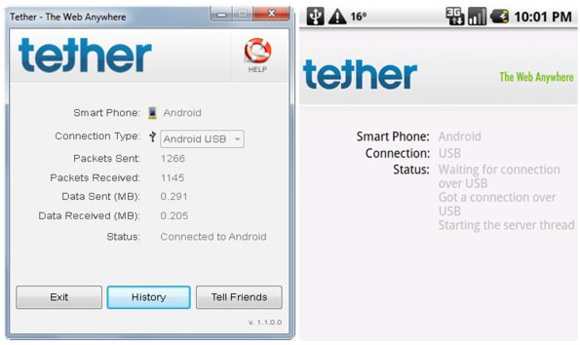
Tether for Android

This application is bit different and complex from other applications via which you can tether internet on an Android device to access internet on a computer or a laptop.


Tether for Android is expensive and costs somewhere around $30, although it has a high price tag it support data transfer speed of up to 7 Mbps.

It is the most advanced and beneficial application for those subscribed to high-speed 3G plans.

Barnacle Wi-Fi Tether

It is a free application that will utilize your Android Internet to serve as a Wi-Fi hotspot. With this free app you can access internet on your portable devices easily, very interesting application.

With this app you can access Internet on mobile phones as well.

Google Goggles on Android updated to read print ads, solve Suduko puzzles

 Google Goggles on Android received an update to 1.3 on Monday. In addition to speed fixes for barcode scanning and the ability to recognize magazine print ads, Google Goggles can now give Sukoku players a cheat ... or rather, treat.


Here are the changes, as noted in Google's blog post:

Barcodes

In Android version 1.3 of Google Goggles, scanning barcodes is much faster. It should take only a second, the company said. Once you do that, Goggles will give you the resultant bar code, which you can then tap to read product reviews, compare prices, and even check in-store availability.

Print ads in magazines and newspapers

Take a picture of a newspaper or magazine ad from an issue August 2010 or newer, and Goggles will recognize the ad and return seach results about the product or brand. Since they put in that line about August 2010 or later, that means someone (or more than one) at Google must have been spending time scanning ads into a database, from August of last year, onwards. Not the most interesting work, we would think.

Sudoku

The final gimmick added to Google Goggles is the ability to solve Sudoku puzzles. We have never been that great at Sudoku, but we tried the new feature on a puzzle, and not only did it recognize the puzzle as a Sudoku game, it solved it as well. Admittedly we had it set on "easy mode."

Watch a video on the Sudoku solving feature below.

Experience Youtube, the full version

YouTube released a full featured version of their app. You can now do most things you do on the site on your mobile app.

Note how the app changes views when you rotate.

Expect more of this on the android tablets and TV. Fragments will be stacked on small screens and will be shown side by side on larger screens, with the ability to collapse them.

YouTube: YouTube App


Android SMS Bug Sends Messages To Random Contact, Running Free for 6 Months

A recent bug in the Android system might cause some abnormal behavior on your smartphone. Your handset may send out text messages to random numbers from contact book and as it seems, this has been happening from the last six months. The issue is rated as a medium priority in bug reports and this fact has rightfully upset Adrian Kingsley-Hughes over at ZdNET.

However, I have seen five Android devices in my vicinity constantly for the last six months and have had contact with a dozen other people who own one. Not one has reported this problem to me until now. Neither has the bug affected me yet. Thus, in my opinion, this is just one of those problems that get more attention than they deserve.

In my opinion, those making complains of this abnormal behavior should check the apps and their permissions. The behavior sounds more like the work of malware. Once again, users are warned not to install apps from anywhere else than the Market and strictly check if an app asks for more permission than it requires. If true, help others by reporting the app in question.

However, I am not shedding off this claim totally. There is a very good possibility that the bug has crept into my phone or anyone else’s, just that the effects are not visible yet. While a few friends including me are using CyanogenMOD, the rest are still on their default ROMs. The bug seems to spring up into action on a firmware upgrade only.

Android Platform Soon To Have VLC Media Player

VLC media player is one of the most admired open source software available in the market. The media player has found immense takers thanks to its compatibility with almost all the video formats used.


VLC Media Player Logo Picture Because of this exceptional quality many Windows users prefer it over the Windows Media player. VLC which has made its way into iPhones and iPads will soon be available in the Android market.


Development Of Android Version Of VLC
According to Jean Kempf, lead developer of VLC, it is simply a matter of weeks before VLC player’s application for Android is released. It is expected that Android version of VLC will go live in early 2011 and when launched, Android will become the second mobile OS to be supported by VLC.

VLC team had been working for quite some time now on the port of VLC but faced difficulties as Android’s multimedia output was based on Java. But with Google launching Native Development Kit, the process had become much easier. However, fragmentation which has been a problem for Android platform might delay the release of the VLC version for Android.

Take your Firefox anywhere.

Firefox 4 for Mobile released an update today.

Its faster and sleeker! Features “undo close tab” and “enhanced sharing” too.

Firefox mobile: UI concepts, Device concepts

Note: Check Settings > Application settings > Unknown sources to be able to install the app.

Manage hidden settings to improve battery life

Spare Parts allows you to change some settings and helps optimize your phones battery life.

Also, install the power widget to shutoff wifi and 4g when you don’t need them.

Battery History
Spare parts setting
QR Code: Spare Parts

Talk to the phone. It now gets personal!

Voice search now recognizes you and understands you better as you talk to it.

QR Code: Voice search
More features:
  • Improved contact name recognition for Voice Actions
  • Lower latency, especially over 3G and EDGE
  • Improved connectivity and less connection errors
---Enjoy with Android---

How to discover and install apps (APK) from outside the Android Market

The Android Market, home to tens of thousands of apps, is an amazing resource. However, it’s not the only one. In fact, some of the most incredible apps aren’t available at the Market, and in some cases, never will be due to Google’s guidelines.

STEP 1: Find the non-market app.
This is a broad step, and often you will have discovered the app by accident. If you’re looking, search engines like Google and websites like Droid-Life are a great place to start. Perhaps the best way to find non-Market apps is to be active in an Android community. Android fans love to post about that new cool app they’ve found. There are also websites like Slide Android Market and AndAppStore, which cater to non-market apps and users who do not have access to the Android Market.

STEP 2: Verify that the app is in the right format.
The file you will download has the extension APK. APK stands for Android Package, and it indicates an Android app installer. Other file types will be sources and resources for developers.

STEP 3: Download the APK file to your phone.
Generally, you will download it to the browser’s default download folder. However, location is irrelevant, so place it wherever you find most convenient.

STEP 4: Configure your Android for a non-Market installation.
Press Menu, then Settings, and then Applications. Check the box labeled Unknown Sources.

STEP 5: Download and install an Android file manager.
Note that you can use the Android SDK to install APK files. However, most users will prefer the convenience of a free file manager app. The most common is the free Apps Installer from the Android Market, but there also many great free and paid third-party options.

STEP 6: Install the new app.
Start the file manager, and select the install option. Browse to the downloaded APK file, and then select it. Select OK, and follow the on-screen instructions, if there are any. This is usually a hands-free process.

STEP 8: (Optional) Secure Android.
Press Menu, then Settings, and then Applications. Uncheck the box labeled Unknown Sources.
For those who prefer to use the Android SDK, replace steps #5 and #6 above with the following:

STEP 1: Download and install the Google Android SDK on your PC.

STEP 2: Type adb into the command shell to access the SDK tool (adb.exe).

STEP 3: Install the Android USB drivers.
The Android USB drivers specifically, not general Windows drivers, are necessary for using the SDK.

STEP 4: Connect the phone to the computer via USB.

STEP 5: Disable USB storage.
Press Settings, the SD card & phone storage, and then disable Use for USB storage.

STEP 6: Install the app.
Type adb install full_filepath_and_filename

STEP 7: Enable USB storage.
Press Settings, the SD card & phone storage, and then enable Use for USB storage.

Installing non-Market Apps on Android Phone

If you own an Android Dev phone, at some point you'd probably want to create and try your own apps (or apps from your friends).

Android Application Setting
To ensure that you do not break your phone by installing malicious apps, Android has a couple of safety features built in. So you need to specifically instruct android to be able to install unsigned / non-market apps.

Menu > Settings > Applications > Unknown Sources
Check "Unknown Sources" to allow install of non-Market applications. While developing, you most likely also want to enable "Stay awake" in Menu > Settings > Applications > Development so that your screen does not go to sleep every often.

Now you can install any app (including malicious ones) the usual way either by browsing to the app using the browser or using adb install command.